AirMirror: AirPlay Receiver
- 3.6
- Rating
- 10.00K
- Installs
- $4.99
- Price

 Analysis by App-foxy
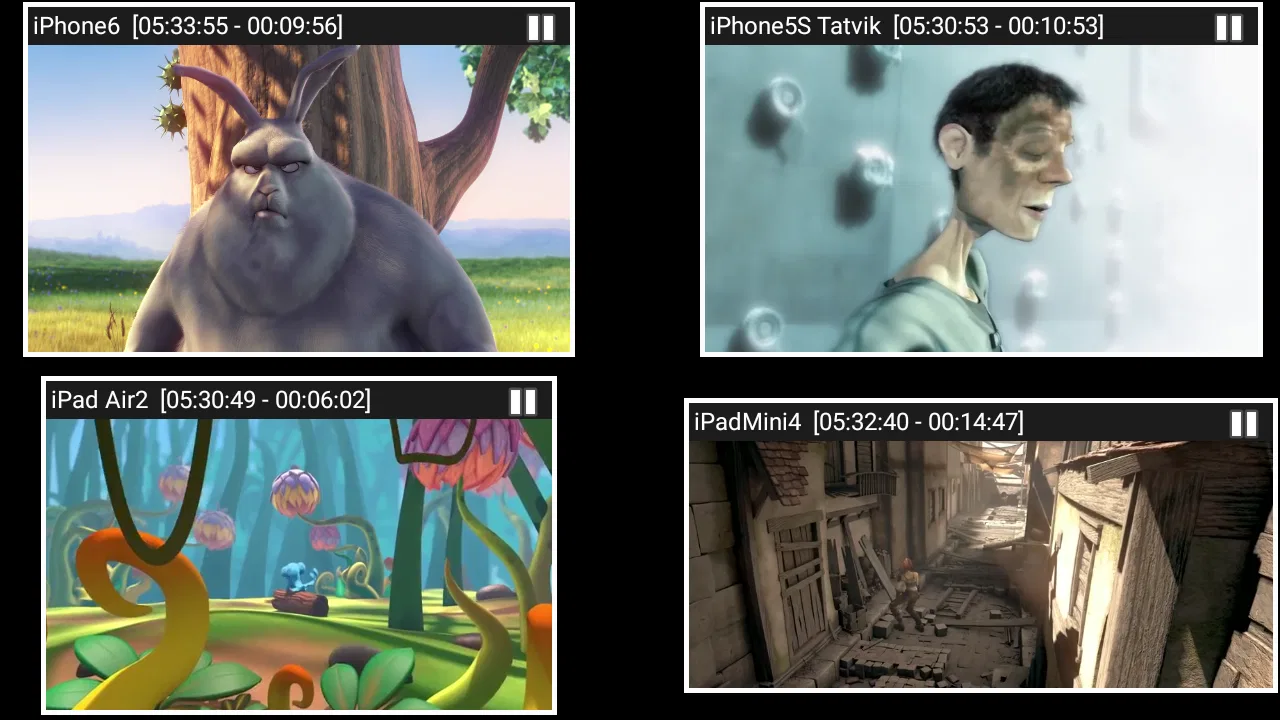
I noticed the appeal of AirMirror quickly: it turns a compatible device into a receiver for screen mirroring and casting from Apple devices. That sounds simple, and in daily use the simplicity is the main reason to try it. Instead of treating a television, tablet, or other screen as an isolated display, the app gives it a role in an Apple-focused viewing setup. I found it most interesting for people who already move between an iPhone, iPad, and a larger screen and want a direct way to show what is on one of those devices.
At the same time, this is not an all-purpose video editor or a complete media library. AirMirror belongs to the video players and editors category, but its practical job is narrower: receiving a mirrored or cast image from Apple hardware. That distinction matters. If you want to edit clips, organize a collection, or replace a streaming service, this is the wrong kind of tool. If your recurring problem is getting Apple content onto another screen, its focused design makes more sense.
What the first week feels like
During the first week, the attraction is easy to understand. I could imagine using it when friends visit and someone wants to show a photo, a short video, a presentation, or a web page to everyone in the room. The sender remains the familiar Apple device, while the receiving side becomes the place where the group watches. That separation is useful because the person sharing does not have to pass a phone around or ask everyone to gather around a small display.
You May Also Like

 Pandora - Music & Podcasts
Pandora’s Music Is Easy to Start, but Harder to Recover
Pandora’s strength is its low-effort path from a seed to a station. Its weak spot is how much confidence it asks you to place in connection, setup, and quiet recovery.

 8 Ball Pool
 Is Built on Rivalries, Rematches, and Routine
A close look at the rivalries, rematches, shared routines, and unanswered safety questions that turn a quick pool match into a persistent mobile community.

 Samsung Music
’s Quiet Strength Is Playing What You Already Own
Its reach comes less from spectacle than from dependable access to a personal library. That simplicity is both the app’s strongest retention engine and its ceiling.

 AccuWeather: Weather Radar
AccuWeather Review: A Quick, Clear Forecast for Everyday Decisions
For everyday plans, the best forecast is the one you can understand quickly. AccuWeather makes rain timing, radar, and local conditions easy to act on, with a few trade-offs.

 Hill Climb Racing
Why Hill Climb Racing Still Turns Crashes Into One More Run
A tiny car, a bumpy hill and one more upgrade: Hill Climb Racing keeps resurfacing because its simple chaos makes every near-miss feel personal.

 AliExpress - Shopping App
AliExpress Makes Global Shopping Feel Personal, but Shoppers Bear the Risk
AliExpress turns a global marketplace into a pocket-sized discovery engine. Its reach is useful, its shopping loop compelling, and its trade-offs easy to miss.
More From Our News Desk
View All News


The best early use case is spontaneous sharing. A family member can bring up a travel photo, a student can display a project, or a colleague can show a mobile demonstration without transferring files first. The value comes from reducing the number of steps between “this is on my Apple device” and “everyone can see it.” I would not call that revolutionary, but it is genuinely convenient when the situation appears often enough.
AirMirror is developed by NeoYantra, and the product’s identity is clear from the moment you understand its purpose. It is not trying to become a universal casting hub for every platform. The emphasis is on receiving content from Apple devices, so the app makes the most sense in households or workplaces where Apple hardware is already part of the routine. A mixed-device environment should be approached more carefully, because the usefulness will depend on who is sending content and which devices they normally carry.
The purchase decision also deserves attention. The app costs $4.99, which places it in the category of a small utility purchase rather than a disposable experiment. I think that price can be reasonable if the receiver will be used repeatedly, especially for presentations or shared viewing. It is harder to justify if the intended use is a single holiday gathering or an occasional photo show. In that situation, a built-in option already available on your devices may be the better first choice.
One practical tip is to decide where the receiver will live before installing it. A dedicated screen in a living room, meeting space, classroom, or guest area gives the app a clear purpose. Moving the receiver around whenever somebody wants to share content makes the experience feel less like a useful appliance and more like a temporary workaround. The strongest setup is the one where the receiving screen is already ready when the need arises.
The app is rated for Everyone, so its intended audience is broad. That does not mean every user will find it equally suitable. A person who wants a simple display bridge may appreciate the focused purpose, while someone expecting advanced playback controls, editing tools, or broad platform coverage will probably feel restricted. I would set expectations early: this is a receiver first, not a full entertainment suite.
Where the novelty becomes useful
The first-week novelty is not only about seeing a phone screen appear somewhere larger. The more useful change is social. Sharing becomes a group activity instead of a one-person viewing session. I found that distinction more important than the technical trick itself. A receiver earns its place when it removes a small but repeated annoyance, such as gathering around a phone or sending files to another device before a meeting can begin.
For work, I would use it as a lightweight demonstration aid rather than as the only presentation system. A mobile app walkthrough, a design preview, or a document opened on an iPad can be easier to discuss when the whole room sees the same image. However, I would still keep a backup plan for an important presentation. Screen mirroring depends on the surrounding setup, and an app that receives content is only one part of that chain.
For home use, the most convincing scenario is a shared screen that is already connected and visible. Imagine returning from a trip and wanting to show several photos at dinner. The person with the iPhone can control what appears, while everyone else watches from a comfortable distance. That is more natural than uploading the photos to another service or handing the phone from person to person. The benefit is modest, but it repeats whenever people share visual content together.
There is also a privacy habit worth adopting. Before mirroring, I would close unrelated conversations, notifications, and personal screens. A receiver displays what the sender chooses to show, but the sender’s device may contain more than the intended photo or video. A quick preparation check prevents an awkward interruption and makes the experience feel more controlled. This is one of those small routines that separates a pleasant setup from an embarrassing one.
Month-to-month value and everyday habits
After the initial excitement fades, the real question is whether AirMirror becomes part of a dependable routine. In my view, its lasting value depends almost entirely on frequency. If you regularly share Apple content with a room, the app can become a quiet utility that earns its space without demanding attention. If you rarely do that, its purpose may disappear after the first few demonstrations.
The strongest recurring workflow is “show, discuss, move on.” A person opens content on an Apple device, sends the view to the receiver, and uses the larger screen for a conversation. This works particularly well for visual material that does not need to be edited on the receiver. The sender keeps control of the source, which is helpful when the sequence changes quickly or when the person presenting knows the material best.
A less obvious advantage is that the receiver can support informal collaboration without requiring every participant to use the same device as the presenter. One person can lead from an Apple device while others focus on the larger image. That can make a short planning session, family decision, or product discussion easier to follow. It is not a substitute for a complete collaboration platform, but it can remove the friction of passing a small screen around.
There is a trade-off, though. Because the receiver’s usefulness is tied to Apple-originated content, it may be underused in a household where Android phones, Windows laptops, or other platforms dominate. I would not buy it simply because screen mirroring sounds attractive. I would first count the situations in which an Apple device is the natural source and a larger screen would genuinely improve the moment. The answer should be based on habit, not curiosity.
The app’s public footprint gives a useful sense of its scale. It has more than ten thousand installs, with an average rating of 3.6 from around three hundred ratings and a couple dozen written reviews. I would read that as a reason to keep expectations practical rather than assuming a polished, universal solution. The product may be exactly right for a narrow need, but the rating does not suggest that every setup will feel effortless.
Another useful habit is to assign one person responsibility for the receiving screen during group events. When nobody knows which device should start the session, small technical delays become more noticeable. A designated host can prepare the receiver, check the source device, and handle switching between items. That simple division of responsibility makes a focused tool feel much more reliable than leaving setup to whoever happens to hold the phone.
How it compares with usual alternatives
The usual alternative is a built-in casting or mirroring method already supported by the devices involved. When that option works cleanly, it may be preferable because it avoids adding another paid app to the chain. AirMirror becomes more compelling when the receiving hardware needs a dedicated receiver role or when the existing arrangement does not provide the Apple-focused display path you want.
Another alternative is transferring photos and videos to shared storage, a messaging group, or a television’s own application. Those methods are better when the goal is to build a permanent collection or let people browse independently. AirMirror is better for live presentation: the sender chooses what appears, and the group sees the same thing at the same time. Choosing between them depends on whether you want a shared library or a shared moment.
For formal presentations, a cable or established meeting-room system is often the safer choice. A wired connection can be less flexible, but it may be easier to standardize before an important session. I see AirMirror as a convenient middle ground for informal or moderately structured sharing, not as a reason to discard every other display method. Its strength is convenience in the right environment, not universal reliability in every environment.
Maintenance, friction, and the reasons it may be abandoned
A receiver app has a different maintenance burden from a normal player. The app itself is only one part of the experience; the sending Apple device, the receiving screen, and the connection between them all matter. That means troubleshooting can become a process of checking the whole path rather than simply reopening one app. When the setup works, this is easy to forget. When it does not, the narrow purpose can feel frustrating because there are fewer alternative ways to use the product.
I would keep the receiving device in a stable location and avoid treating it like a portable accessory. Repeatedly changing its role, display, or connection can turn a quick sharing task into a setup exercise. A fixed arrangement also helps other household members remember how to use it. Long-term value often comes less from new features than from making the same workflow predictable.
One source of fatigue is the gap between a technically possible action and a socially smooth one. Mirroring a screen may be useful, but people still need to prepare the source, choose the right content, and remember that everything visible may be shared. If the group only wants to watch a single video, opening that video directly on an available television app may be less distracting. AirMirror earns its keep when live control or broader screen sharing matters.
Another source of fatigue is dependence on the sender. The receiving screen does not replace the Apple device that supplies the content. If the sender leaves, locks the wrong screen, receives an interruption, or needs the device for another task, the viewing session can become awkward. This is a meaningful trade-off for households that expect a receiver to behave like an independent media player. AirMirror is more like a remote display than a self-contained library.
There is also a learning curve for less technical users. Even a clear purpose does not guarantee that every guest understands the difference between mirroring, casting, and opening content directly. I would prepare a short verbal instruction for regular users and keep it consistent. The fewer choices people face, the more likely the app will be used instead of ignored.
Version 2.5 is the current version, and the app was released on February 14, 2017. Those details place it in a mature product context rather than a brand-new experiment. For me, that makes the basic concept easier to trust, but it also reinforces the need to judge the app by the workflow it supports today. A long presence does not automatically make a utility essential; recurring usefulness still has to come from your own setup.
The minimum operating system is 11, so compatibility should be checked before purchase or installation. This is especially important if the receiving device is older or if it is being repurposed for a specific room. A receiver that cannot run the app cannot become part of the intended routine, and discovering that after planning a setup is an avoidable disappointment.
Who should keep it, and who should skip it
I would recommend AirMirror to someone with a regular Apple-to-larger-screen habit: a family that shares photos, a teacher or presenter who demonstrates mobile content, or a small team that often discusses material from an iPhone or iPad. These users are likely to notice the convenience beyond the first week. The app can become a background tool that appears whenever a group needs to see the same thing.
I would be more cautious for someone who mainly watches subscription video services, wants offline playback, or expects a receiver to store and organize media. Those needs point toward a dedicated streaming device, a television application, or shared storage instead. I would also skip it if Apple devices are only occasional visitors in the environment. A paid receiver has little long-term value when the source platform rarely appears.
Before deciding, I would test the intended workflow with the actual room and screen. Think about where the receiver will sit, who will initiate sharing, and whether the Apple device is usually available when the group needs it. This practical check is more useful than judging the app from its name. The question is not whether mirroring is appealing in theory, but whether it removes a repeated inconvenience in your life.
Does it earn permanent space?
My long-term verdict is cautiously positive, with a very specific condition: AirMirror earns permanent space when it solves a recurring Apple-device display problem. Its lasting value is not in novelty, visual polish, or a broad collection of media features. It comes from making a particular kind of shared viewing easier. Once the receiver has a stable place and the household understands the routine, that focused role can be worthwhile.
I would not describe it as an essential app for everyone. The $4.99 purchase is sensible for frequent users, but unnecessary for people who already have a satisfactory built-in method or who only need occasional screen sharing. The 3.6 average also encourages a measured decision rather than an automatic recommendation. This is a tool to match with a specific environment, not a universal upgrade for every screen.
What I like most is the way it supports live, group-oriented use without asking the receiver to become a full media center. What I like least is the same limitation viewed from another angle: the app remains dependent on the Apple source and the surrounding setup. That narrowness is either its clarity or its weakness, depending on what you expect.
After the novelty fades, I would keep it installed only if I found myself reaching for it during ordinary weeks, not merely during the first demonstration. If the app turns repeated sharing into a quick, familiar action, it has done enough to justify its place. If the receiver sits unused because direct playback, cables, or existing casting tools already handle the job, removing it would be the honest choice. For the right Apple-centered setup, AirMirror is a practical specialist; for everyone else, it is better viewed as an optional convenience than a must-have.
FAQs for AirMirror: AirPlay Receiver
01What is AirMirror: AirPlay Receiver, and what can I use it for?
AirMirror: AirPlay Receiver turns a compatible Android device into a receiver for AirPlay content from Apple devices. After connecting both devices to the same Wi-Fi network, you can typically mirror an iPhone or iPad screen, display photos, or stream supported videos and music. It is useful for presentations, casual photo sharing, and viewing mobile content on a larger screen, although supported features may vary by device and app.
02How do I connect an iPhone or iPad to AirMirror: AirPlay Receiver?
First, install and open AirMirror: AirPlay Receiver on the receiving Android device, then make sure the Android device and your iPhone or iPad are connected to the same local Wi-Fi network. Open Control Center on the Apple device, select Screen Mirroring or the AirPlay option, and choose the receiver shown by the app. If it does not appear, check network permissions, disable VPNs, and confirm that both devices are using the same router.
03Does AirMirror: AirPlay Receiver work with every iPhone, iPad, Android phone, or smart TV?
Compatibility is not universal. The app is primarily designed to receive AirPlay connections on supported Android devices, while the sending device must provide AirPlay or screen-mirroring controls. Performance also depends on Android version, Wi-Fi quality, hardware capability, and the content being shared. Some smart TVs and streaming apps may use protected playback systems that prevent mirroring, so users should verify compatibility before relying on it for important presentations.
04Can I stream Netflix, Disney+, YouTube, or other protected video services through the app?
You may be able to mirror menus, photos, and certain videos, but protected streaming services can restrict screen mirroring because of digital-rights management. In those cases, the receiver may show a black screen, display an error, or play audio without video. YouTube and other services can also behave differently depending on whether AirPlay is supported directly. The app should therefore be viewed as a general receiver rather than a guaranteed solution for every streaming platform.
05Is AirMirror: AirPlay Receiver free, and are there any privacy or security concerns?
The availability of free features, advertisements, subscriptions, or in-app purchases can depend on the version and store listing in your region, so check the current download page before installing. Because the app receives content over the local network, use it only on trusted Wi-Fi networks and avoid leaving the receiver active when it is not needed. Review requested permissions and privacy information, particularly if you plan to share personal photos, messages, or sensitive screen content.
Pros
- Turns an Android device into a convenient AirPlay receiver.
- Supports wireless screen mirroring from compatible Apple devices.
- Useful for sharing photos
- videos
- and presentations on a larger screen.
- Simple setup with minimal configuration on the receiving device.
- Can be handy for streaming content without extra cables or adapters.
Cons
- Performance depends heavily on Wi-Fi quality and network stability.
- Some protected streaming content may not mirror or play correctly.
- Audio and video can experience noticeable delay during mirroring.
- Compatibility may vary between iOS versions and Android devices.
- Free features may be limited by ads or in-app purchase requirements.

AirMirror: AirPlay Receiver
Gallery